Code challenge from lantmateriet.se
Yesterday I found a code challenge on http://www.lantmateriet.se/knackkoden that I decide to take a look on. We first need to decode the base 64 encoded text to get the actual instructions.
Problem
Gör ett program som skriver ut talen i mängden {1, 2, …, 10500} i stigande ordning.
Om talet är jämnt delbart med 3 så ska www. skrivas ut istället för själva talet.
Om talet är jämnt delbart med 5 så ska lantmateriet skrivas ut istället för själva talet.
Om talet är jämnt delbart med 7 så ska .se skrivas ut istället för själva talet.
Om talet är jämnt delbart med 3, 5 och 7 så ska www.lantmateriet.se skrivas ut istället för själva talet.
Inga nyradstecken ska skrivas ut, utan allt ska skrivas ut på en och samma rad.
Utskriften inleds enligt nedan:
1 2 www. (och så vidare…)
Inget mellanrum som sista tecken.
MD5-summan av utskriften är 402087a86f4fbd5d01d80baec13fddc5
Men vad är SHA-1-summan?
Solution
Anyone that can come up with another or better solution?
public static void Main() { const int NumberOfIterations = 10500; var sb = new StringBuilder(); for (var i = 1; i <= NumberOfIterations; i++) { if (i % 3 != 0 && i % 5 != 0 && i % 7 != 0) { sb.Append(i + " "); continue; } if (i % 3 == 0 && i % 5 == 0 && i % 7 == 0) { sb.Append("www.lantmateriet.se "); continue; } if (i % 3 == 0) { sb.Append("www. "); } else if (i % 5 == 0) { sb.Append("lantmateriet "); } else if (i % 7 == 0) { sb.Append(".se "); } } var resultString = sb.ToString().TrimEnd(); if ("402087a86f4fbd5d01d80baec13fddc5" != GetMD5HashData(resultString, Encoding.UTF8)) { Console.WriteLine("Error missmatch MD5 hash"); return; } Console.WriteLine("The SHA1 hash is:" + GetSHA1HashData(resultString, Encoding.UTF8)); } |
You can download the complete solution here: LantmaterietKnackkoden
System.UnauthorizedAccessException: Access to the path is denied when using System.OI.FileStream
During a recent deployment to production environment we started to get System.UnauthorizedAccessException on places we hade not seen it before. After some debugging a pattern appeared. The problem is that if you don’t use the FileStream constructor with FileAccess parameter you will get FileAccess.ReadWrite selected by default. So in our cases the User account running our service did only have read access to the file with is correct since we are only expecting to read from the file.
using (FileStream fs = new FileStream(filePath, FileMode.Open)) { … } |
Make sure, you ask for what you really need. If your application needs only Read access to a file, make sure to specify that in your FileStream constructor.
using (FileStream fs = new FileStream(filePath, FileMode.Open, FileAccess.Read)) { … } |
HowTo update appsettings programmatically
Recently I was writing functional test for an application that read settings from the appsettings element in App.Config. The problem was that the application under test was expecting to react different based on the settings so need a way to alter the values between tests. I ended up writing bellow code for it
private static void SetAppSettings(string key, string value) { Configuration config = ConfigurationManager.OpenExeConfiguration(ConfigurationUserLevel.None); config.AppSettings.Settings[key].Value = value; config.Save(ConfigurationSaveMode.Modified); ConfigurationManager.RefreshSection("appSettings"); } |
Get all iteration paths in TFS programtically
A common way to organize work items in TFS is to assign them to different iterations. I’m using this with the scum model where every sprint corresponds to one iteration. So how can we get all iteration paths in TFS to use them in our own implementation. The information is not saved on the work items, we will need to look directly at the project object and recursively iterate on the iteration object tree to get all iteration paths.
Example project
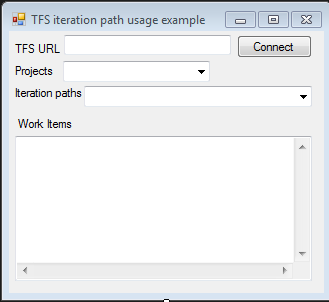
In this example you will be able to connect to a TFS server and get all work items based on project and iteration path listed.
Read more
Free options for Reflector (.NET decompiler)
After Reflector did change their licensing so it was no longer free to use I did stick around for a long time on an old version of Reflector. The time have now come to find an replacement for Reflector. After some searching I found 4 good candidates.
JustDecompile
http://www.telerik.com/products/decompiling.aspx
Feature
• Fast code navigation
• Create visual studio projects
• Extract resources from assemblies
• Easy assembly management
• Visual studio inline decompilation
• Command line support
• Integrate with Windows Explorer Context Menu
• Silverlight XAP decompilation from URL
Read more
Open sourced some of my projects
I recently decided to open soruce some of my projects. You can find them under Projects on the blog.
DiveBuddy Planner
http://divebuddyplanner.codeplex.com
Is decompression planning application for windows phone 7. The algorithm used is based on Buhlmann ZHL16A, ZHL16B and ZH 17B with m-value gradient conservatism. Both air, nitrox and trimix diving is supported.
Scrumy
https://scrumy.codeplex.com
Scrumy is Visual Studio plugin. The current functionality cover printing TFS item to be used on a scrum progress board or kanban board.
How to isolate Directory.Exists in unit testing using disposable pattern
Earlier i wrote a blog post about isolating DateTime.Now with disposable pattern. Here is a little more advance example for the static method Directory.Exists.
So here is the simple example of product code that we want to test
public void ProcessFiles(string path) { if (!DirectoryIsolator.Exists(path)) { throw new ArgumentException("Path doesn't exist"); } } |
This first test method is simple setting the return value to false before calling the product code
[TestMethod()] [ExpectedException(typeof(ArgumentException))] public void Class1_ProcessFiles_SettingReturnValueFalse() { using (DirectoryIsolator.ExistsIs(false)) { Class1 target = new Class1(); string path = @"C:\windows"; target.ProcessFiles(path); } } |
Message box that can center on parent form
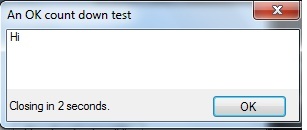
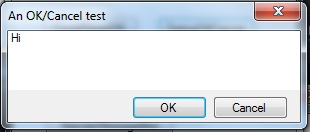
When using the built in MessageBox class to show message you are not able to center the dialog based on the parent form. This leads to that the dialog normaly popup in the center of the screen even if the application it’s executed only cover the upper right corner for example. The solution is simple to create our own MessageBox clone with this added functionality. I was also missing a possibility to show a self closing message. So I could for example give the user 10 seconds to respond to the message, after that I would simple close the message dialog and use the default response.
How to isolate DateTime.Now in unit testing
When writing unit tests for codes that is using DateTime.Now you will find yourself in a situation where you can’t automate functionality that are dependent on the time since the time is changing constantly. You are also not able to test for example that your codes work correctly for leap year or change of year, etc.
How would you test correctness of bellow simple example?
public bool IsIt2012 { get { return (DatemTime.Now.Year == 2012); } } |
The solution is to introduce a “wrapper” for DateTime.
public bool IsIt2012 { get { return (DatemTimeIsolator.Now.Year == 2012); } } |
Failed to open key when Installing Dynamics NAV 2009
When installing Dynamics NAV 2009 one of my friend’s rune into this problem:
—————————————————————————–
Microsoft Dynamics NAV 2009 Build 27808
Error Report
RoleTailored client
Microsoft Dynamics NAV 2009 RoleTailored client
Fatal error during installation.
Could not open key: UNKNOWNMSComDlg.CommonDialog.1CLSID. Verify that you have sufficient access to that key, or contact your support personnel.
—————————————————————————–
The problem here is that we have a mismatch of .NET. The simplest solution is to install latest version of a .NET and run the installer again.