Temporary table in NAV
I recently found a very interesting blog post about temporary tables by Vjekoslav Babic. It explains really good the different ways a temporary table is handled when used as a parameter . You can basically call a method with a table by value or by reference. When you are using by value the data in the table is copied to a new variable and when you are using by reference you are actual using the same variable as the calling method. This work as expected when not using temporary tables. When it comes to temporary tables you may get an unexpected behavior when using the “by reference”.
Here is an example
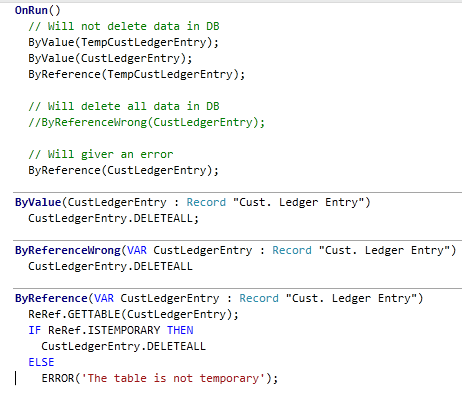
The “ByRefereceWrong” will actual delete all records if you are passing a none temporary record to it. A fixed version with verification can be found in “ByRefence” where we use record reference and the ISTEMPORARY method.
Vjekoslav blog post found here does cover some other problem areas as “phantom insert”. I would recommend reading the complete post.
How to isolate Directory.Exists in unit testing using disposable pattern
Earlier i wrote a blog post about isolating DateTime.Now with disposable pattern. Here is a little more advance example for the static method Directory.Exists.
So here is the simple example of product code that we want to test
public void ProcessFiles(string path) { if (!DirectoryIsolator.Exists(path)) { throw new ArgumentException("Path doesn't exist"); } } |
This first test method is simple setting the return value to false before calling the product code
[TestMethod()] [ExpectedException(typeof(ArgumentException))] public void Class1_ProcessFiles_SettingReturnValueFalse() { using (DirectoryIsolator.ExistsIs(false)) { Class1 target = new Class1(); string path = @"C:\windows"; target.ProcessFiles(path); } } |
Message box that can center on parent form
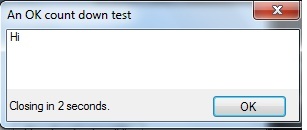
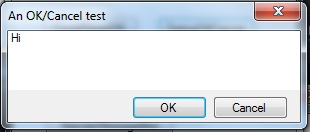
When using the built in MessageBox class to show message you are not able to center the dialog based on the parent form. This leads to that the dialog normaly popup in the center of the screen even if the application it’s executed only cover the upper right corner for example. The solution is simple to create our own MessageBox clone with this added functionality. I was also missing a possibility to show a self closing message. So I could for example give the user 10 seconds to respond to the message, after that I would simple close the message dialog and use the default response.
Remove ALL CAPS menus in visual studio 2012
One of the first thing I did change after install VS 2012 was the upper cases menu. I find it harder to read menu options that is always upper case. So here is the trick.
Start regedit and add this key to change to VS 2010 behavior
HKEY_CURRENT_USER\Software\Microsoft\VisualStudio\11.0\General\SuppressUppercaseConversion
REG_DWORD value: 1
How to isolate DateTime.Now in unit testing
When writing unit tests for codes that is using DateTime.Now you will find yourself in a situation where you can’t automate functionality that are dependent on the time since the time is changing constantly. You are also not able to test for example that your codes work correctly for leap year or change of year, etc.
How would you test correctness of bellow simple example?
public bool IsIt2012 { get { return (DatemTime.Now.Year == 2012); } } |
The solution is to introduce a “wrapper” for DateTime.
public bool IsIt2012 { get { return (DatemTimeIsolator.Now.Year == 2012); } } |
Problem installing demo database
Saurav did get before me in writing this blog post. Have you ever seen below error when installing the demo database.
Could not connect to the SQL database. (-2147467259 master ). This can be caused by insufficient permissions. Indirect permissions through Windows group memberships may not work as expected when User Account Control (UAC) is turned on.
Few resolutions to the problem
1) UAC is turned on.
2) SQL server is not running
3) Your user doesn’t have sufficient privileges on the SQL server.
4) Old database file are left on the system.
Take a look at Saurav’s blog for the solutions. Saurav’s blog post is found here
Google alerts
Last week I found a new cool application/service from Google. It’s called “Google Alerts” and it will simple let you save a normal search query for Google search and on a daily or weekly basis you will get an email containing any changes in the search result. The first alert I did put up was a simple search on the keyword “NAV” to get any news around Dynamics NAV sent directly to my inbox. I also found that this is a really good way to find new blogs and other people/companies interested in the same thing as you and of course general news about the product. Give it a try at http://www.google.com/alerts and newer miss any news in your area of interest.
Installing NAV 2009 R2 without Active Directory
Normally you need to have an Active directory server running to use multi-tier of NAV 2009 R2. But in some cases this is not possible or existing. In NAV 2009 R2 we got an new configuration option called ClientCredentialType that is meant to be used over WAN. But I will in this blog post show one simple way to get this up and running for development and test purpose, in a LAN environment Read more
Every time when adding/deleting a user the NAV service shuts down
Recently I run into a problem where NAV service did shut down every time I did add or delete a user.
The event log explain the problem like bellow. So it obvious that we of some reason can’t connect to the database.
Type: System.Data.SqlClient.SqlException
Class: 14
LineNumber: 1
Number: 916
State: 1
Source: .Net SqlClient Data Provider
ErrorCode: -2146232060
Message: The server principal “XX\YY” is not able to access the database “ZZ” under the current security context.
When looking at the security for database “ZZ” I found the same problem as the event log was pointing at, no trace of user “XX\YY” with gives the NAV service access to the database. It turns out that when adding or deleting a NAV user all user privileges is re-synced, and any user not part of the new list is deleted. And if the NAV service account is not part of the user list, NAV service can’t longer connect to database.
The solution is very simple. You have to make sure that the service account is added as a user in NAV under Tools – Security – Windows Logins. Followed by syncing logins.
Silent or unattended installation on NAV
What is silent or unattended installation
Simply said silent install is installation without any UI. In this case it’s about how to run “setup.exe” in silent mode. It’s recommended that you only run “setup.exe” when you install a new NAV installation, because the installer have been tested by them using this procedure only. So by that said it’s no longer supported to install from the different msi files directly. This is true for all NAV 2009 releases. The major problem you may run into if you are installing directly from the msi files is that you will not get prerequisites (as .Net, Report Viewer and so on) installed and you will also miss out one some pre installs checks (validating that you have everything needed as outlook).
How to-do it?
It’s very simple. “setup.exe” does support some different parameters for this purpose:
/quiet <– will turn of the UI
/log [filename] <– create a log text file in the specified location
/config [filename]<– point to the configuration file to use during the installation
/uninstall <– will simple un install the product
/repair <– repairs a bad installation